API Reference
Who can use this feature?
- The storefront SDK works on any plan and needs no key.
- An API key is required for the GraphQL Customer API, the Chat Conversations API, webhooks, and MCP. All four require the Pro or Plus plan.
Start here
"I want Chatty to talk to the rest of my stack — where do I begin?" There are six ways in, and they are not interchangeable. Picking the wrong one usually means the code works, but it can never do the thing you actually wanted.
Read the two tables below, then check Common wrong picks. Five minutes here saves a rebuild.
How much of this you can do yourself. Creating the API key takes a minute and needs no code: follow Generate your API key below. What happens after that splits in two. If the tool you're connecting has a setup screen that asks for a Chatty API key, paste the key there and you're done. If it doesn't, someone has to write the code that calls Chatty, so plan on a developer.
If you're looking for ready-made integrations without code, see Klaviyo, Zendesk, or Joy instead.
What each one does
| Way | What it does | What it can't do | Read more |
|---|---|---|---|
| Built-in integrations | Connect Chatty to Klaviyo, Zendesk, Joy, Gorgias, Powerful Contact Form, SEA Survey, or a non-Shopify website. You fill in a form in the app. | Anything the guide for that app doesn't list. There's no way to extend one. | Integrations |
| Storefront SDK | Control the chat widget on your storefront: open or close it, prefill or send a message, pass customer and cart context, react to what the visitor does in chat. | Read past conversations, run on your server, or change settings saved in the app. It only exists in the shopper's browser. | Storefront SDK |
| Chat Conversations API | Read and write conversations from your own systems: list and fetch conversations and messages, send replies, resolve, assign, tag, add notes and attributes, read customers, members, and tags. | Push anything to you — you ask, it answers. It also can't change widget settings. Each endpoint needs the matching permission on your key. | Chat Conversations API |
| Webhooks | Tell your server the moment something happens: 9 events across messages, conversations, and new customers. | Give you history, and it can't reply. To answer, your server calls the Chat Conversations API. | Webhooks |
| GraphQL Customer API | Read the contacts Chatty collected — names, emails, channels, order counts, total spend, chat activity — with exactly the fields you ask for. | Write anything. It's read-only, and it doesn't return message content. | GraphQL Customer API |
| MCP server | Let an AI assistant you run — your own bot, or a tool such as Claude — discover your store's tools, look up a product, an order, or an FAQ, and post its reply into the conversation. | Act as a general-purpose API. The assistant only gets the tools your store has switched on. | MCP server |
Two pages apply to every API above: Authentication explains how credentials work, and Errors and rate limits covers what to do when a request fails.
Pick by what you want to do
| You want to… | Use |
|---|---|
| Connect a tool that already has a Chatty guide | Built-in integrations — no code, no key |
| Copy conversations into a helpdesk, database, or spreadsheet | Chat Conversations API |
| React the moment a new message arrives | Webhooks to hear it, Chat Conversations API to reply |
| Reply to customers from a tool your team already uses | Chat Conversations API |
| Open the chatbox from your own button, or prefill a message | Storefront SDK |
| Pass the logged-in customer, the cart, or the current product into chat | Storefront SDK |
| Export contacts to a CRM, an email platform, or a CSV | GraphQL Customer API |
| Let your own AI assistant read and answer conversations | MCP server |
| Build a report on chat volume and outcomes | Chat Conversations API for conversations, GraphQL Customer API for customers |
| Add Chatty to a website that isn't your Shopify store | Website integration |
Common wrong picks
Each pair below looks like the same job. It isn't.
Chat Conversations API vs Webhooks
The API answers when you ask. Webhooks speak when something happens. If your feature is "within seconds of a customer message, do X", polling the API on a timer is the wrong shape: you either poll too often and hit the limit, or too rarely and arrive late. Subscribe to message.created instead, and call the API only to fetch detail and to reply.
Storefront SDK vs Chat Conversations API
The SDK runs in the shopper's browser and touches only that shopper's live widget. The API runs on your server and sees every conversation in your store. Anything involving history, other customers, or work that must happen while nobody is on the site belongs to the API. Anything about what the widget does on the page belongs to the SDK.
MCP server vs Chat Conversations API
Both can post a reply. The difference is who decides. With MCP, an AI assistant is handed a set of tools and picks which to call. With the API, your code decides and calls a fixed path. If there's no model in the loop, MCP adds a layer you don't need.
GraphQL Customer API vs Chat Conversations API
"Customer" appears in both. GraphQL returns people and their totals, and nothing else — it's read-only and has no message content. The Chat Conversations API returns the conversations and the messages themselves. Wanting "everything about this shopper" usually means both.
Built-in integration vs building your own
Check Integrations before you scope any development. If a guide already exists for the tool you're connecting, that path is a form in the app, not a project.
The public API vs the paths in your browser
The admin inbox in your browser calls near-identical paths under /api/chat/..., authenticated with your admin session. Those are not the public API and an API key won't work on them. The public paths carry no /api prefix: https://app.chatty.net/chat/conversations.
Plans, credentials, and limits
| Way | Plan | Needs a developer | Credentials | Limits worth knowing |
|---|---|---|---|---|
| Built-in integrations | See the guide for each app | No | None | Set in the app |
| Storefront SDK | Any plan | Yes, to add JavaScript to your theme | None | Runs only where the widget is loaded |
| Chat Conversations API | Pro or Plus | Yes | X-Api-Key: sk_... | 120 requests/min per key, 300 requests/min per IP |
| Webhooks | Pro or Plus | Yes | X-Api-Key: sk_... to manage subscriptions | 10 subscriptions per store; 10-second delivery timeout; up to 7 attempts over about 9 hours |
| GraphQL Customer API | Pro or Plus | Yes | x-api-id and x-api-secret | Read-only; a rejected request returns 200 with an errors array, not 401 |
| MCP server | Pro or Plus | Yes | X-App-Id and Authorization: Bearer sk_... | 8 tools are always available; more appear when the matching feature is switched on or when the key has the matching permission |
You can keep up to 5 active API keys per store, and the same sk_ key works across the Chat Conversations API, webhooks, MCP, and GraphQL — each just sends it in a different header. See Authentication for the details.
Generate your API key
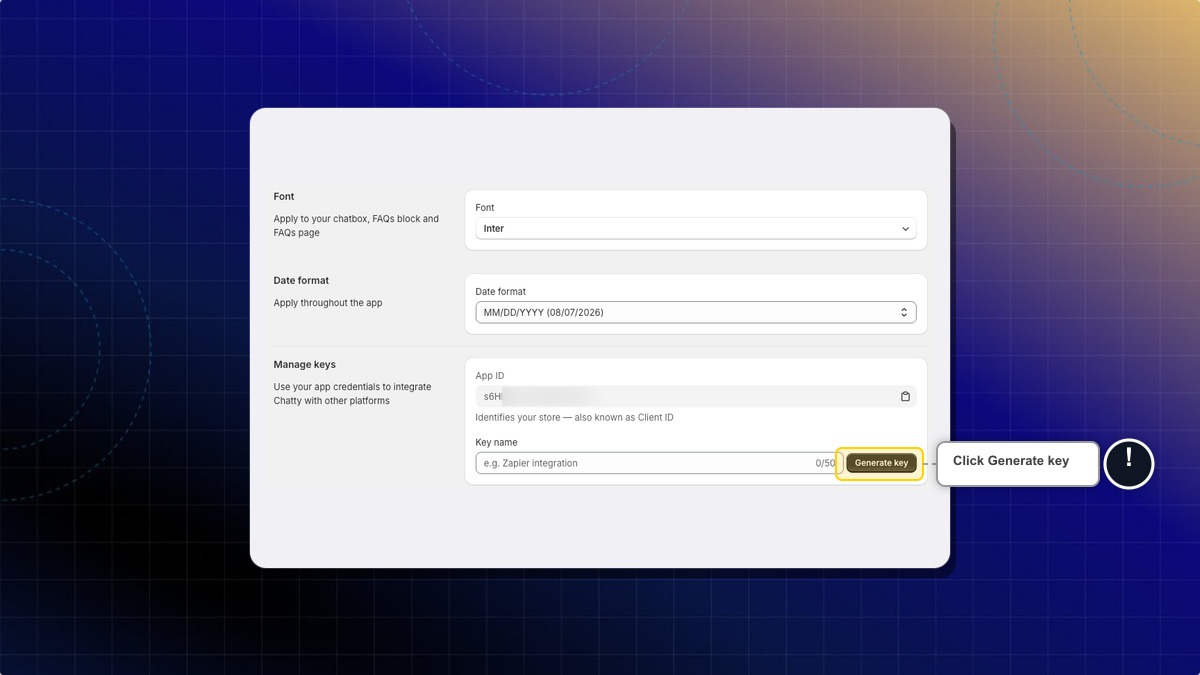
All API credentials live in one place: Settings → General → Manage keys.
Create an API key
Under Permissions, tick what the key needs, for example Read conversations or Read customers. A key with nothing ticked is refused on every Chat Conversations API and webhook call. Then enter a name in Key name. Name it after the tool that will use it, for example Zendesk sync. The name can be up to 50 characters. Then click Generate key.
The new key appears in your list with the full sk_ value visible.
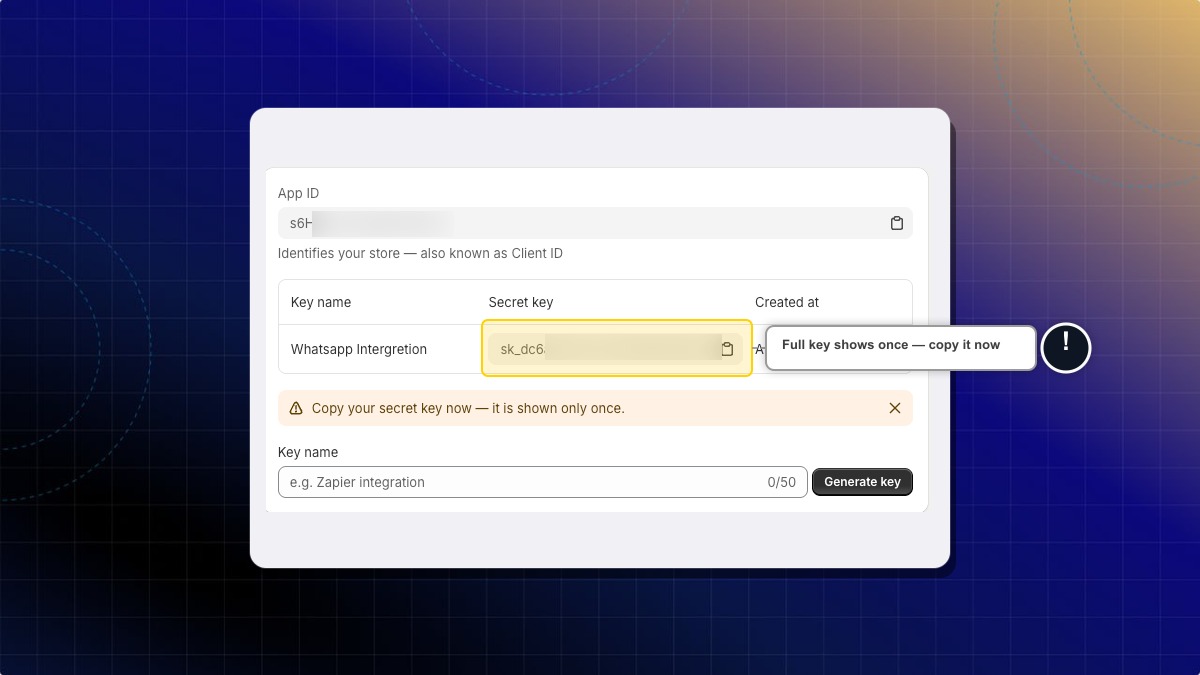
Copy the key before you leave the page. Chatty stores only a hash of it, so the full key can never be shown again. If you lose it, delete the key and create a new one.
You can keep up to 5 active keys per store. Create one per integration so you can delete a single key without breaking the others.
A new key takes up to 30 seconds to start working. A deleted key stops on its next request. A 401 on your first request right after creating a key is expected. Wait and try again before you go looking for a bug in your code.
Creating and managing keys requires the Pro or Plus plan. On other plans the panel is replaced by a note with an upgrade link.
Find your App ID
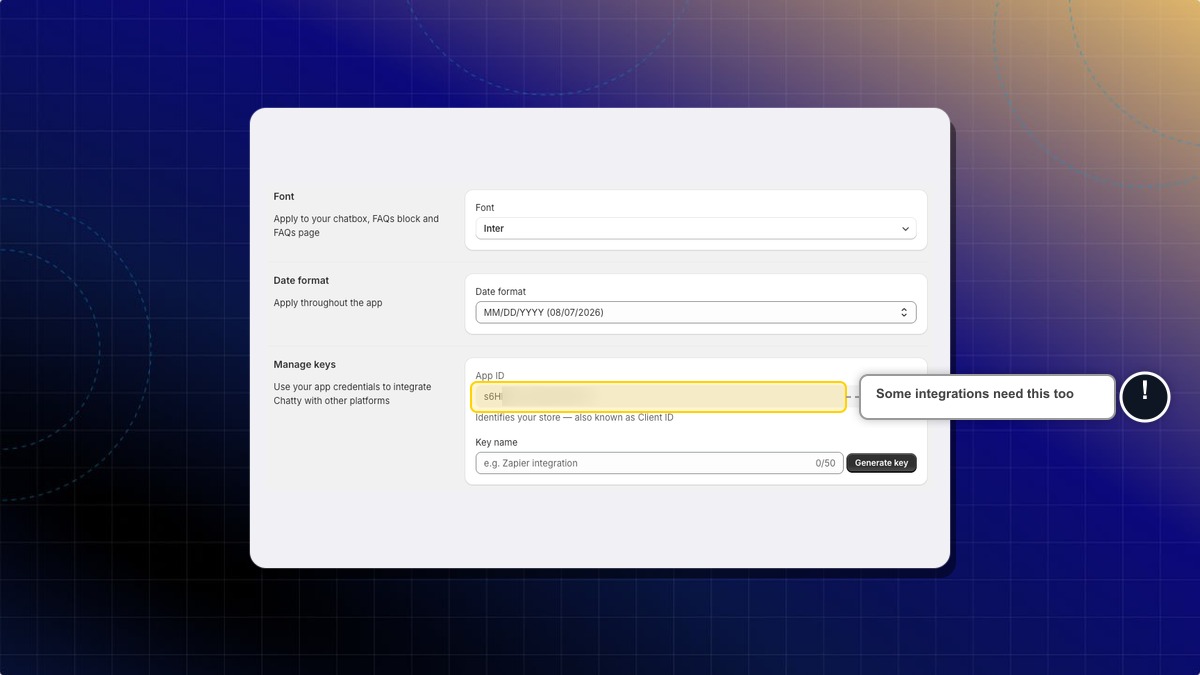
Your App ID sits at the top of the same panel. Some tools call it a Client ID. It identifies your store, and some integrations need it alongside your key.
Two things that surprise people
A conversation list can look shorter than your inbox. The conversation list reflects the store's primary conversation store. Older conversations that predate it don't appear in the list, but you can still fetch them one by one by id. Build any reconciliation on ids you already hold, not on the assumption that the list is complete.
A message you just sent may not appear immediately. Chatty writes messages to a live layer first and syncs them after, so a read taken instantly after a write can come back without it. Don't treat "not in the list yet" as "failed".
What you can build
Export contacts to a spreadsheet
Use the GraphQL customers query with pagination to pull all contacts, then write them to a CSV.
Sync high-value customers to an email platform
Filter by totalSpent and push matching customers to your email tool via its own API.
Alert your team on every new customer message
Subscribe to the message.created webhook, act only when senderType is customer, and notify your team.
Embed chat actions in your storefront
Use the SDK to open the chatbox from a custom button or prefill a message.
Need help?
If you're still unsure which way fits, contact the Chatty support team from your dashboard. Tell them what you want to happen, where it should happen (the storefront, your server, or another tool), and whether a developer is available. That's enough to point you at the right page.
 Chatty Help Center